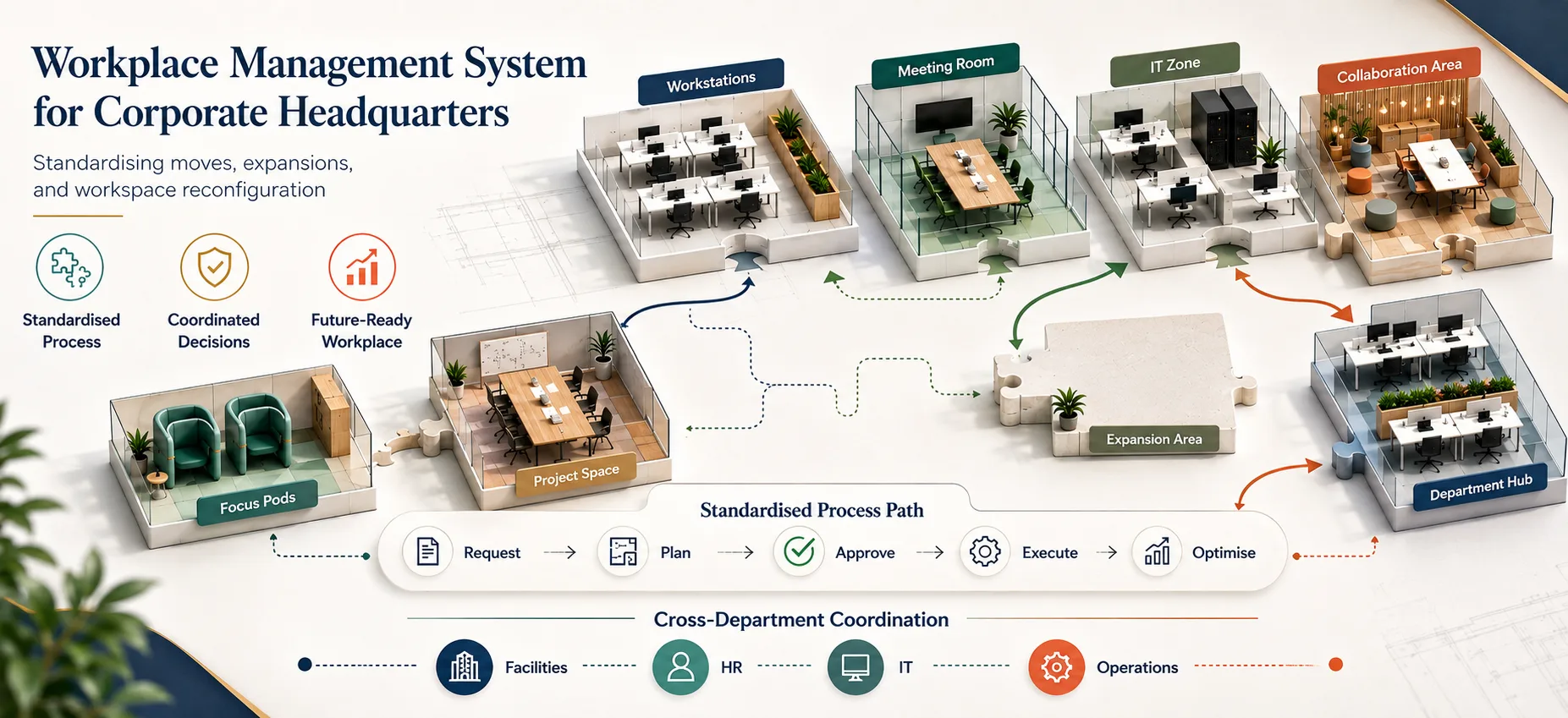
Managing office moves, expansions, and workspace reconfigurations at corporate headquarters is increasingly complex, involving multiple departments and evolving work trends. Achieving coordinated planning and optimal space utilisation is essential for supporting productivity and hybrid work while maintaining business continuity.
A workplace management system is an integrated software platform that standardises, automates, and optimises office moves, expansions, and workspace reconfiguration, enabling workplace operations managers at corporate headquarters to achieve greater efficiency and minimise disruption.
What is a workplace management system and how does it help corporate headquarters manage moves and reconfigurations?
A workplace management system provides a centralised, automated platform for planning and tracking office moves, expansions, and reconfigurations. It improves coordination, ensures compliance, and delivers real-time visibility across departments, helping headquarters optimise space use while reducing errors, downtime, and operational risk.
Why corporate headquarters need a standardised workplace management system
Key operational challenges in managing corporate moves and expansions
Corporate headquarters must synchronise relocations and workspace changes across facilities, IT, HR, and external suppliers—often under tight deadlines and cost constraints. Without standard processes, communication breakdowns, scheduling conflicts, and documentation gaps lead to delays, business disruption, and decreased employee satisfaction. Hybrid working further amplifies the need for dynamic workspace management and rapid adaptation.
- Frequent misalignment between teams during move projects
- Manual processes overwhelmed by hybrid work requirements
- Increased costs and downtime due to errors and miscommunication
Impact of unstandardised processes on corporate space planning
Fragmented move management results in duplicated work, inefficient layouts, and poor alignment with corporate space strategy. The absence of unified, real-time data hinders proactive planning, reducing opportunities for cost savings and impeding regulatory compliance. Over time, this can result in underutilised office assets and increased legal risk.
- Lack of integrated data visibility for decision-making
- Persistent compliance and audit challenges
- Misaligned workspace layouts and wasted real estate
Core capabilities of modern workplace management systems for workspace reconfiguration
Office move management software features
The most effective workplace management systems offer a comprehensive suite of features to streamline and automate every stage of office moves and reconfigurations. These capabilities ensure moves progress smoothly from planning to completion, with embedded compliance and full auditability.
- Flexible project timelines and visual Gantt charts
- Role-based allocation for all internal and external stakeholders
- Real-time progress tracking and notifications
- Automated workflow approvals and documentation control
- Seamless integration with integrated workplace management systems and space planning databases
Workspace reconfiguration tools and real-time space utilisation tracking
Modern platforms support agile reconfiguration and ongoing space optimisation by combining interactive digital floorplans, hot-desking tools, and real-time analytics. This approach enables headquarters to flexibly adapt space to changing business requirements and hybrid workforce models.
- Visual drag-and-drop floorplans with CAD/BIM integration
- Dynamic hot-desking and desk booking features
- Live occupancy insights via IoT sensors or access systems
- Actionable analytics on peak occupancy and space vacancy
Corporate space planning integration and compliance
Industry-leading workplace management systems integrate with IWMS and corporate compliance frameworks, ensuring all workspace changes meet regulatory standards and strategic objectives. Built-in reporting supports efficient audit preparation and ongoing governance.
- Direct synchronisation with master space and compliance plans
- Automated audit trail and compliance reporting (e.g., Health & Safety, Equality Act)
- Workflow alignment with long-term business targets
- Consistent regulatory risk reduction and governance support
Implementing a workplace management system for corporate headquarters
Phased implementation roadmap
To ensure successful adoption and return on investment, a workplace management system should be introduced in clearly defined stages, each designed to engage stakeholders and refine operational processes at scale.
- Map current workflows and assess operational needs
- Pilot the system in a controlled environment (e.g., scheduled move)
- Roll out platform enterprise-wide with full systems integration
- Continuously evaluate, refine, and adapt for maximum value
Change management and training best practices
Adoption of a new system depends on effective training and clear accountability. Engaging all relevant departments, delivering role-specific training, and maintaining continuous support ensure that the transition is both smooth and sustainable.
- Inclusive stakeholder consultation and engagement
- Function-specific training and detailed SOPs
- Proactive support channels for rapid issue resolution
- Clear process ownership and performance KPIs for move efficiency
Leveraging automation and data analytics for ongoing optimisation
Automation within the workplace management system eliminates repetitive manual work, freeing up operational teams to focus on higher-value tasks. Continuous data collection powers evidence-based decision-making, space-demand forecasting, and proactive asset management for long-term efficiency.
- Automated workflow for approvals and status updates
- Predictive analytics for occupancy and headcount trends
- Proactive maintenance and resource allocation
- Data-driven investment decisions for space expansion or reduction
Conclusion
Centralising and automating moves, expansions, and workspace reconfiguration with a workplace management system empowers corporate headquarters to reduce disruption, maximise space efficiency, and maintain compliance. Proactive, automated change management supports business continuity, employee engagement, and the agility required for modern hybrid working environments.
Key Takeaways
- Workplace management systems enable consistent, automated coordination of corporate moves and workspace reconfiguration, improving efficiency and reducing operational risk.
- Workplace management systems reduce downtime and manual errors by delivering real-time notifications and standardised workflows.
- Workplace management systems deliver enhanced space utilisation, compliance adherence, and data-driven optimisation aligned with corporate strategy.
Discover how eFACiLiTY can optimise your workplace operations with a workplace management system. Schedule a demo today.
FAQ
What is a workplace management system?
A workplace management system is specialist software used to plan, standardise, and automate office moves, expansions, and workspace reconfigurations. It provides operations managers with a central platform to coordinate departments, optimise space, and maintain business continuity efficiently and cost-effectively.
How does a workplace management system compare to general facility management tools?
Workplace management systems specialise in move planning and workspace reconfiguration, offering structured workflows, task assignment, and data integration. General facility management tools mainly handle maintenance and assets—they do not provide the automation or analytics required for large-scale move management projects.
How should corporate headquarters implement a workplace management system?
Implementation should begin with process mapping and needs assessment, followed by a pilot deployment for targeted moves, and then a phased enterprise rollout. Successful adoption requires integrating with existing IWMS and HR systems, delivering comprehensive training, and maintaining strong support and compliance frameworks.